Firefox Setup (Mac)
To set up Firefox, open Refocus Mac Settings > Advanced Settings > Web Browser Permissions > look for Firefox and follow the directions.
Alternatively, you can:
Drag-and-drop the extension into Firefox
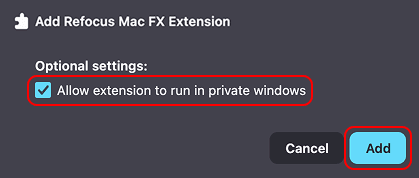
Select “Allow extension to run in private windows” and press “Add”
Optionally, restart Firefox and restart Refocus
At this point, the blocking should work. You can navigate to Refocus Mac Settings > Advanced Settings > Web Browser Permissions > look for Firefox and check the status.
Please note that Safari and Chrome represent 90% of the browser market share so bug fixes are prioritized for those browsers. If you are experiencing issues with some browser, please use the “Contact Us” button in the app so the problem can be fixed.
Troubleshooting
If you’ve completed the extension installation, and it’s still not working, try:
Restarting Firefox
Restarting Refocus
The Firefox Extension works with only one Firefox Extension supported browser at a time.