Screen Time Limit Bug With iOS 26.2
Learn how to resolve the Screen Time limit bug introduced in iOS 26.2
The Screen Time Limit Bug
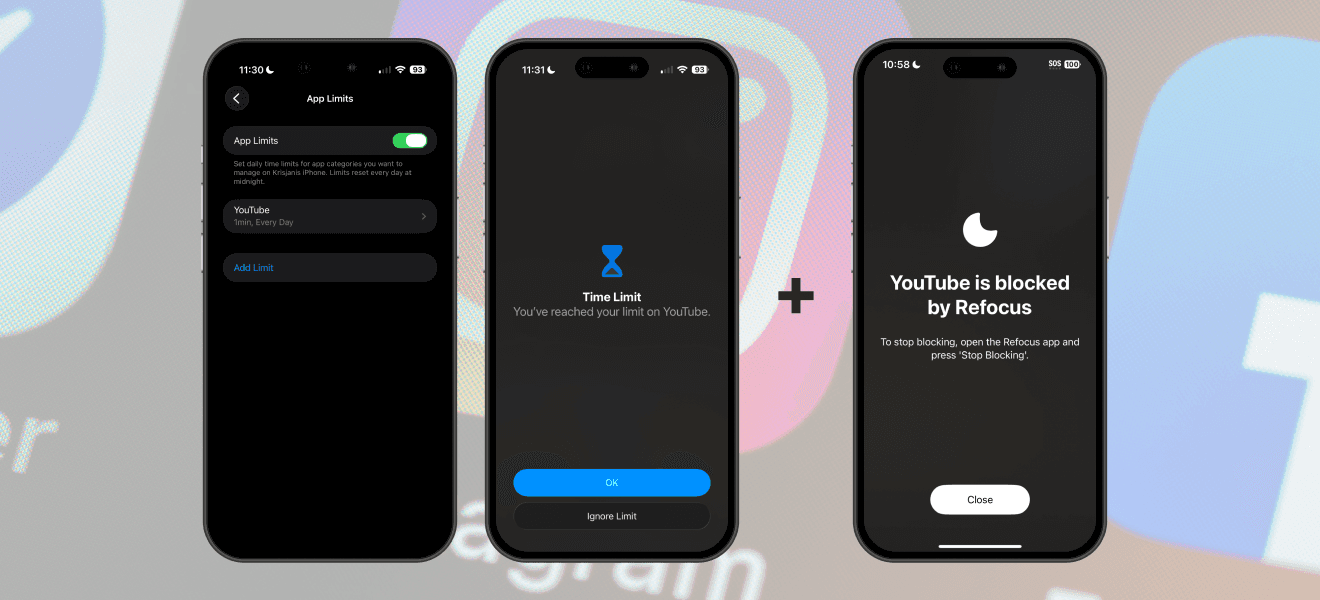
Starting with iOS 26.2, there's a new bug affecting Apple Screen Time. On your device's first pickup, all app limits might activate prematurely, even if you haven't used any apps or websites. This issue occurs sporadically and unpredictably.
How To Fix (If You Use Apple Screen Time)
There's no permanent solution until Apple resolves this issue. For now, you can apply these temporary fixes:
Option 1: Disable App Limits, wait about 3 seconds, then re-enable them
Option 2: Restart your device
Option 3: Delete your existing App Limit settings, then recreate them exactly as before
These methods "reset" Screen Time, forcing it to recalculate your limits. You will need to repeat these steps if the issue recurs on subsequent days.
How to Fix (If You Use a Third-Party App)
Third-party apps, such as Refocus, are also impacted since they rely on Apple's Screen Time technology. Each app may offer its own workaround.
For Refocus users:
Open Refocus Settings (gear icon at the top-right corner)
Tap Advanced Settings
Tap Fix App Blocking
This refreshes the limits, temporarily resolving the issue for that day. Refocus is actively exploring more streamlined ways to help you manage this issue.
How You Can Help
If you're an Apple beta tester or developer, submit feedback via feedbackassistant.apple.com under Developer Technologies & SDKs > iOS > Device Activity Framework > Events. Reference the feedback number Refocus provided: FB21267341.
Alternatively, you can contact Apple Support and mention feedback number FB21267341. This may help expedite the fix.
Other People Reporting This Problem
"Screen Time App not working since last update (26.2) Any fixes available?" (Reddit, r/ios)
"Is screen time broken for anyone else on iOS 26.2?" (Reddit, r/ios)
"iOS 26.2 Screen Time Bug" (Reddit, r/ios)
"iOS Screentime Limit Not Working" (Reddit, r/ios)
"Screen Time limits go grey before the limit is reached?" (Reddit, r/applehealth)
"Screen time bug" (Reddit, r/iphone)
"Screen time limits on the fritz after iOS 26.2" (Reddit, r/iphone)